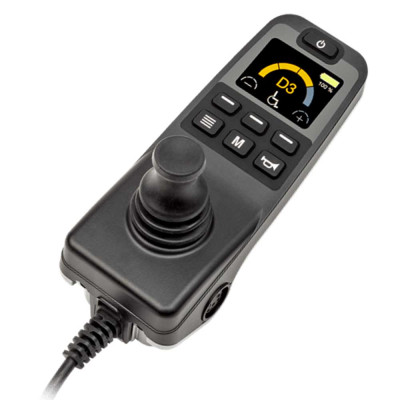
The Quantum Q-Logic 3 EX is a configurable, expandable drive control system for compatible Quantum powerchairs. It combines joystick operation, a colour display and Bluetooth device access, with additional controls available according to the powerchair and individual configuration.
Advanced Powerchair Control
Q-Logic 3 EX is a modular electronics system designed to operate a compatible Quantum powerchair and its configured functions. The joystick controls the chair’s direction and speed while also providing access to menus, drive profiles, powered seating and compatible connected devices.
Different input devices and control modules can be incorporated according to the user’s requirements. These may include the Q-Logic 3 EX joystick controller, an Enhanced Display, an attendant control, specialist input devices or the optional iAccess control module.
Joystick Control
Operates the powerchair and navigates the controller menus
Bluetooth
Access compatible computers, tablets and smartphones
Expandable System
Supports different input and seating-control configurations
Bluetooth Device Access
The Q-Logic 3 EX joystick controller includes Bluetooth connectivity. Once correctly configured and paired, the powerchair controls can be used to access compatible computer, tablet and smartphone functions.
This can allow the joystick or another configured input device to act as a Bluetooth mouse or accessibility control. The available functions depend on the connected device, its accessibility settings and the individual Q-Logic configuration.
Configured Around the User
Drive profiles, powered seating access, input devices and menu functions can be configured around the powerchair and the user’s assessed requirements. The system can support multiple input devices and preset drive profiles, helping provide suitable control in different environments.
The colour display provides information about the selected drive profile, speed setting, battery condition and available chair functions. The precise screens and controls shown will depend on the installed equipment and programming.
Important: Q-Logic 3 EX is not a universal plug-and-play replacement joystick. Compatibility, installation and drive programming must be confirmed and completed by an authorised provider or trained technician.
Optional Controls and Environmental Access
An optional Q-Logic 3 EX Enhanced Display can be used with specialist drive controls to show system information separately. Its built-in environmental controls can also operate compatible infrared-controlled appliances, such as televisions, when correctly configured.
The optional iAccess module provides programmable buttons and toggles for quick access to configured functions such as powered seating. Neither the Enhanced Display nor iAccess should be assumed to be included with every Q-Logic 3 EX installation.
Assessment and Compatibility
Q-Logic 3 EX is available with selected Quantum powerchairs, including certain Edge 3 configurations. Suitability depends on the power base, seating system, existing electronics and the controls required by the user.
Modern Mobility can help establish whether Q-Logic 3 EX is appropriate for a new powerchair configuration or a compatible replacement. Explore our powerchair electronics, view the wider powerchair range or discover more products from Quantum.
Q-Logic 3 EX Features
The functions available through Q-Logic 3 EX depend on the powerchair and selected control configuration. The following capabilities are supported by the Q-Logic 3 system but may require compatible equipment or professional setup.
Joystick and Colour Display
The hand control provides directional and speed control alongside an LCD screen displaying drive, seating, battery and system information.
Bluetooth Device Access
Built-in Bluetooth can provide access to compatible computer, tablet and smartphone functions using the powerchair’s configured control input.
Configurable Drive Profiles
Up to four drive profiles can be professionally configured to suit different environments and individual control requirements.
Powered Seating Access
When connected to compatible powered seating, the controller can provide access to configured functions such as tilt, recline, seat elevation and powered leg support.
Multiple Input Devices
The expandable system can support selected alternative controls, attendant controls and other input devices for more individualised operation.
Customisable Display
Available display settings include day and night brightness, measurement preferences, time settings and a choice of background colours.
Clinic Mode
Clinic Mode helps authorised professionals configure multiple input devices and assign drive modes during an assessment.
System Information
The display provides battery information and distinguishes between information, warning and error messages to help users and providers understand the system’s status.
Optional Control Components
Q-Logic 3 EX Enhanced DisplayThe optional Enhanced Display provides a separate screen for use with specialist drive controls. Its built-in environmental controls can operate compatible infrared-controlled appliances, such as televisions, and it can function as a Bluetooth mouse emulator.
iAccessOptional iAccess buttons and toggles can be programmed to provide convenient access to selected seating, Bluetooth and environmental-control functions.
Alternative and Attendant ControlsDepending on the powerchair and assessment, Q-Logic 3 may support alternative input devices, a stand-alone joystick or an attendant control. Availability must be confirmed for the individual configuration.
Powerchair Compatibility
Q-Logic 3 EX is available with selected Quantum powerchairs, including certain Quantum Edge 3 configurations. This does not mean that every Edge 3 or every Quantum powerchair uses the same controller or wiring configuration.
If the controller is being considered as a replacement, Modern Mobility will need to identify the exact powerchair, existing electronics and required control functions. A matching appearance or connector alone is not enough to establish compatibility.
Important: Do not fit, exchange or reprogram a powerchair controller without confirmation from an authorised provider or trained technician. Incorrect programming can affect speed, braking, stability and overall operation.
Q-Logic 3 EX or Q-Logic 3e?
Q-Logic 3 EX is the expandable option for more complex configurations, including specialist input devices and optional environmental controls.
Q-Logic 3e provides many related functions in a simpler package but does not support specialist drive controls or environmental controls. The appropriate system depends on the powerchair and individual assessment.
Using and Caring for Q-Logic 3
The following guidance summarises everyday operation and care information from the manufacturer. Always follow the operating instructions supplied with the controller and the owner’s manual for the connected powerchair.
Professional setup required: The initial setup and drive programming must be carried out by an authorised Quantum Rehab provider or trained technician. Users should not attempt to alter technical drive parameters themselves.
Before Using the Controller
• Make sure the controller has been configured for the user and powerchair by an appropriate provider.
• Check that the joystick is not bent or visibly damaged and returns to its neutral central position.
• Ensure the controller and its connections are clean, dry and securely fitted.
• Learn which drive profiles, seating functions and optional controls have been enabled for the individual configuration.
Basic Joystick Operation
1. Turn on the powerchair and controller using the on/off and mode-select control.
2. Select the required drive profile where more than one profile has been configured.
3. Move the joystick in the required direction. Moving it further from the neutral position increases the requested speed.
4. Release the joystick or return it to its central position to bring the powerchair to a controlled stop.
5. Turn the controller off when the powerchair is stationary to help prevent unintended movement.
Using Powered Seating
Where compatible powered seating functions have been configured, the controller can provide access to the seating screen. The joystick can then be used to select and operate the available actuator.
The functions shown depend on the powerchair and seating configuration. Follow the instructions supplied with the seating system and any training provided during setup.
Bluetooth Device Access
The Q-Logic 3 EX hand control includes Bluetooth for connecting to compatible computers, smartphones and tablets. The required Bluetooth function must first be enabled within the controller’s configured menus.
Follow the supplied instructions or ask the provider for help when pairing a device for the first time. Pairing a Bluetooth device does not provide access to the technical drive programming.
Understanding Controller Messages
The Q-Logic 3 display can show information, warning and error messages. Information messages do not normally affect operation, while warnings and errors may indicate a condition affecting the powerchair’s functions or performance.
• If the joystick was not centred when the controller was switched on, turn the system off, allow the joystick to return to neutral and turn it on again.
• If Bluetooth stops working, turn the system off, wait five seconds and then turn it on again.
• If the system reduces speed because of excessive temperature, turn the powerchair off and allow it to cool.
• Contact the provider if an error persists, an unfamiliar code appears or the powerchair does not operate normally.
Care and Storage
• Avoid exposure to rain, snow, ice, salt and standing water wherever possible.
• Keep the controller and powerchair clean and dry.
• Follow the powerchair owner’s manual for the correct cleaning method rather than applying unapproved cleaning products.
• Store and operate the powerchair within the manufacturer’s specified temperature range of approximately -8°C to 50°C.
Q-Logic 3 Home Screen Video
This official Quantum Rehab video provides an introduction to the Q-Logic 3 home screen.










Reviews
There are no reviews yet.