
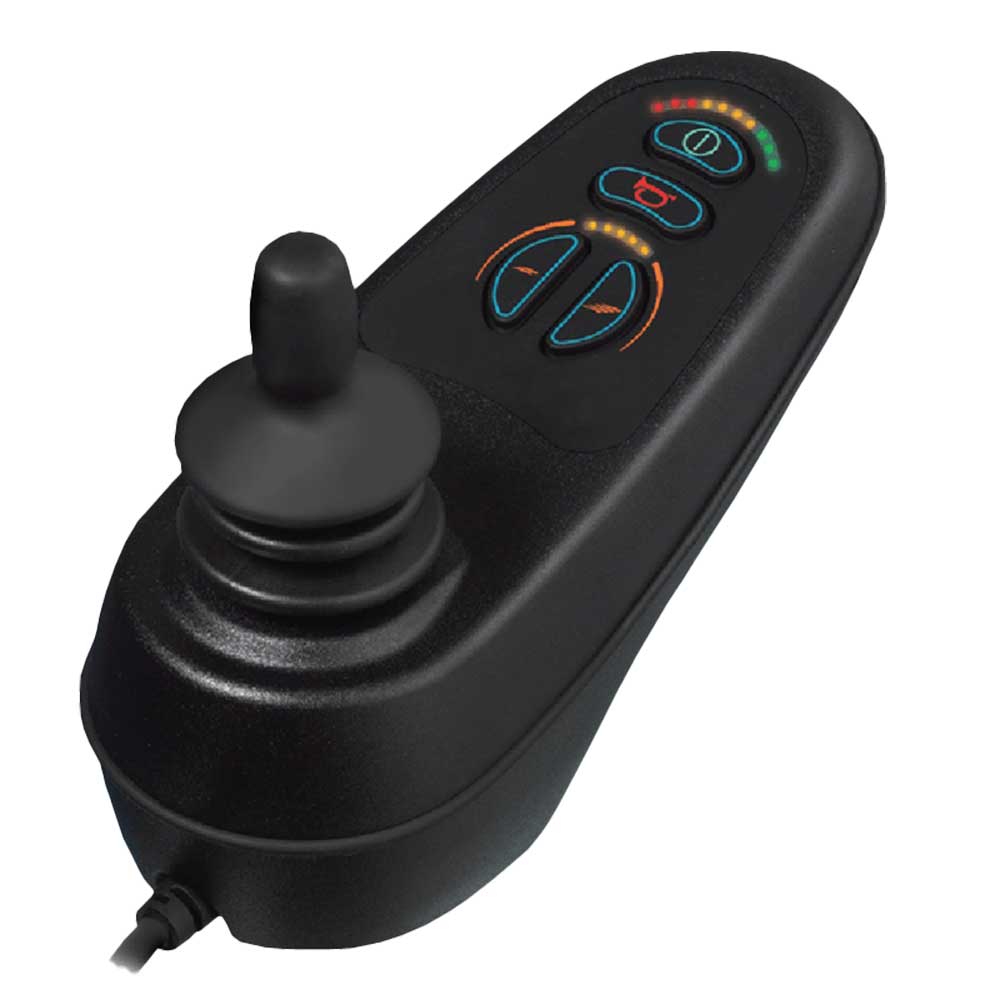
Quantum VR2 Powerchair Controller

The Quantum VR2 powerchair controller is an easy-to-use modular control system for compatible entry-level and mid-range powered wheelchairs. Its joystick module provides straightforward power, speed and horn controls, with selected configurations supporting additional seating functions.

VR2 components are available in different specifications and are not universally interchangeable. Please enquire with details of your powerchair and existing controller so compatibility, configuration and professional installation requirements can be confirmed.

Enquire Now

If you’re disabled or have a long-term illness, you will not be charged VAT on products designed or adapted for your own personal or domestic use.

To find out more information contact one of our mobility experts or visit the government website for further advice.

All you need to do is add everything to your basket and when you are ready to checkout just simply click the shopping cart icon in the top right of the screen. Once you have entered your details you will be asked ‘Are you eligible for VAT Exemption?’ and if you qualify click the ‘Disability VAT Exemption’ option and continue to fill in the form once you have completed the form your cart will change to show VAT at £0.

Quantum VR2 Powerchair Controller

The Quantum VR2 is an easy-to-use modular control system for compatible entry-level and mid-range powerchairs. Its joystick module provides straightforward driving, power, speed and horn controls, with additional functions available through selected configurations.

The underlying VR2 system is manufactured by Curtiss-Wright under the PG Drives Technology range. It can be configured for drive-only operation or combined with compatible seating, lighting and attendant-control modules according to the powerchair and user’s requirements.

Clear User Controls

The joystick module provides simple access to power, speed adjustment, the horn and directional driving.

Modular System

The VR2 combines separate joystick and power modules, allowing the system to be configured for different powerchairs.

Seating Options

Compatible configurations can control one or two powered seating actuators from the joystick module.

Attendant Control

A Dual Attendant Module can be incorporated where compatible occupant and attendant control is required.

How the VR2 System Is Configured

A basic VR2 system contains a joystick module and compact power module connected by a flexible cable. The joystick receives the user’s commands, while the power module controls the motors, electromagnetic brakes and other configured functions.

Different joystick and power modules are available. Some provide drive-only operation, while others include buttons for powered seating or lighting. A separate attendant module can also be added to a compatible system.

Configuration must be confirmed: VR2 controllers that look similar may have different connectors, current ratings, programming and supported functions. A controller should never be selected from its appearance alone.

Key VR2 Features

• Designed for compatible entry-level and mid-range powerchairs.

• Ergonomic joystick module with a clear control layout.

• Power, speed, horn and directional driving controls.

• Compact separate power module.

• Thin, flexible interconnecting cable.

• Drive-only, actuator and lighting configurations available.

• Support for up to two compatible powered seating actuators.

• Compatible Dual Attendant Control option.

• Components designed to support professional servicing.

Explore more powerchair controllers and electronic components or view the wider Quantum Rehab range.

VR2 Configurations and Specifications

The VR2 is a family of controller modules rather than one universal joystick. The functions and electrical specification depend on the joystick module, power module and other components fitted to the powerchair.

Drive-Only

Provides the essential controls required to switch on, select a speed and drive a compatible powerchair.

Actuator Control

Selected joystick and power modules can operate one or two compatible powered seating functions.

Lighting Control

Compatible configurations can provide controls for lights, indicators and hazard lights through an additional module.

Dual Attendant Control

Allows control to be exchanged between the powerchair occupant and an attendant using a compatible secondary module.

Published System Specifications

Control-system familyVR2
Electronics manufacturerCurtiss-Wright / PG Drives Technology
Associated powerchair rangeQuantum Rehab
Product typeModular powered-wheelchair control system
Intended applicationCompatible entry-level to mid-range powerchairs
Basic system architectureJoystick module, power module and interconnecting cable
Supply voltage24V DC
Power-module ratings60A, 70A or 90A depending on configuration
Powered seating controlUp to two compatible actuators
Brake voltage12V or 24V DC depending on system configuration
Maximum actuator current12A
Maximum battery-charging current12A RMS
Moisture resistanceIPX4
Published operating-temperature range-25°C to 50°C
Published storage-temperature range-40°C to 65°C
Available additional functionsPowered seating, lighting and Dual Attendant Control
Universal replacement controllerNo
Professional installation and programmingRequired as applicable to the powerchair and replacement component

Specifications vary: These figures describe the wider VR2 system family. They do not mean that every joystick or power module supports every current rating, seating function, light or attendant control.

VR2 Joystick-Module Types

VR2 JSMDrive-only joystick module
VR2 JSM-AJoystick module with actuator controls
VR2 JSM-LJoystick module with lighting controls
VR2 JSM-A-LJoystick module with actuator and lighting controls
VR2 AttendantSecondary module for a compatible Dual Attendant Control system

The reference printed on the existing controller should be checked before a replacement or system change is proposed.

VR2 Compatibility, Installation and Servicing

A VR2 controller must be matched to the complete powerchair system. Similar-looking joystick modules may use different functions, connectors, power ratings or programming.

Do not connect an unconfirmed controller: Installing an incompatible or incorrectly programmed component could affect driving, braking or powered seating. Compatibility and setup should be confirmed by a competent mobility-equipment technician.

What Determines Compatibility?

• Powerchair manufacturer, model and serial number.

• Existing joystick-module and power-module references.

• Power-module current rating.

• Motor and electromagnetic-brake specification.

• Connector, cable and wiring arrangement.

• Number and type of powered seating actuators.

• Lighting and indicator requirements.

• Whether attendant control is fitted or required.

• Left- or right-hand joystick mounting.

• Existing programming and individual drive settings.

Information to Include with Your Enquiry

Providing the following information will help Modern Mobility identify the existing system and determine the appropriate next step:

Powerchair Details

Provide the manufacturer, exact model, serial number and approximate age of the powerchair.

Controller References

Include every model, product or serial reference visible on the joystick and power modules.

Required Functions

Explain whether the chair has powered seating, lights, indicators or attendant controls.

Photographs

Send clear images of the joystick, keypad, labels, power module, cables and connectors where possible.

If the controller has developed a fault, describe what happened before the problem appeared, whether the powerchair still switches on and the pattern shown by its battery indicator.

Installation and Programming

A replacement joystick may require calibration, while a replacement power module can require programming for the chair’s motors, brakes, speed, acceleration and seating functions. Existing settings must not simply be assumed to suit another component.

• Secure the controller and cable using suitable mounting hardware.

• Route cables away from sharp edges, wheels and moving seat components.

• Confirm correct motor, brake and battery connections.

• Programme the system for the individual powerchair and user.

• Test driving, stopping and every powered function before handover.

• Record the installed configuration for future servicing.

Controller Care

• Keep the joystick module as dry as possible and protect it during heavy rain.

• Do not direct a hose, pressure washer or strong water jet at the controller.

• Wipe the housing using a soft, slightly damp cloth and dry it afterwards.

• Regularly inspect the joystick gaiter, keypad, cable and mounting bracket.

• Stop using the powerchair if the controller becomes loose, damaged or unreliable.

• Do not dismantle, modify or attempt to reprogramme the system without suitable training and equipment.

Using the VR2 Powerchair Controller

The precise keypad depends on the VR2 joystick module fitted. Always follow the powerchair and controller instructions supplied with the completed system.

Typical VR2 Controls

On and Off

Switches the control system on or off. The joystick should be centred before the system is switched on.

Battery Indicator

Shows the approximate battery state and communicates operating information or fault codes.

Speed Controls

Allow the selected maximum driving speed to be increased or reduced within the programmed limits.

Joystick

Controls direction and speed. A greater movement away from the centre normally produces a faster response.

Do not use the on/off button as a routine brake: Release the joystick to stop the powerchair normally. Switch the system off while moving only when an emergency requires it.

Before Driving

• Check that the joystick module and its mounting bracket are secure.

• Make sure the connecting cable is not trapped, stretched or damaged.

• Centre the joystick before switching the controller on.

• Check the battery indicator for an adequate charge and any unusual flashing pattern.

• Select a low speed when starting in a confined or unfamiliar area.

• Test that the chair stops when the joystick is released.

• Confirm that every required seating, lighting or attendant function operates correctly.

Common Indicator Messages

A flashing battery indicator can communicate a controller status or fault. The meaning depends on the number and pattern of illuminated bars.

• Joystick displaced: Centre the joystick, switch the controller off and then switch it on again.

• Charger connected: The system may prevent driving while the battery charger remains attached.

• Controller locked: The configured unlocking sequence must be completed before the chair can be driven.

• Speed limited: The powerchair may deliberately restrict its speed, commonly because a powered seat is elevated.

• System fault: Stop using the chair and arrange professional inspection if the fault remains or its cause is uncertain.

Quantum VR2 Controller FAQs

What is the VR2 powerchair controller?

The VR2 is a modular powered-wheelchair control system containing a joystick module, power module and connecting cable. Different configurations can support driving, powered seating, lighting and attendant control.

Is the VR2 manufactured by Quantum Rehab?

The VR2 system is manufactured by Curtiss-Wright under the PG Drives Technology range. It is offered as a controller option for compatible Quantum Rehab powerchairs.

Is this listing for a complete controller or one module?

The required component or system configuration will depend on the powerchair and the reason for the enquiry. Confirm whether a joystick module, power module, cable or complete configured system is required before ordering.

Will any VR2 joystick work with my powerchair?

No. The module, connectors, supported functions and programming must match the existing powerchair system. Similar appearance does not confirm compatibility.

Can the VR2 operate powered seating?

Compatible actuator-control configurations can operate one or two powered seating functions. The joystick module, power module, actuators and programming must all support the required movements.

Can the VR2 control powerchair lights?

Yes, where the powerchair has the appropriate VR2 lighting-compatible joystick and Lighting Module. Drive-only controllers do not automatically include lighting controls.

Is attendant control available?

A compatible Dual Attendant Module allows control to be exchanged between the occupant and an attendant. The attendant can control driving speed and compatible seating actuators.

Is VR2 the same as Q-Logic 3 or Q-Logic 3e?

No. VR2 and Q-Logic are different controller families with different modules, capabilities and compatibility requirements. They should not be treated as directly interchangeable.

Does a replacement VR2 controller require programming?

It may require calibration or programming for the powerchair’s motors, brakes, speed response and powered functions. This should be assessed and completed by a competent mobility technician.

What do flashing lights on a VR2 controller mean?

The battery indicator also displays operating and diagnostic information. Record the number and pattern of flashing bars and provide it when requesting technical assistance.

Can the VR2 controller be used in the rain?

The wider VR2 system has a published IPX4 moisture-resistance rating, but it should still be kept as dry as possible. Protect the joystick during heavy rain and never clean it using a hose or pressure washer.

Why is there no fixed price shown?

The required VR2 module, configuration, programming and installation work can differ between powerchairs. Modern Mobility must first identify the existing system and confirm what is required.

What should I provide when enquiring?

Provide the powerchair make, model and serial number, the references printed on the existing modules, the functions fitted, a description of the problem and clear photographs of the controller, labels and connectors.

Enquire NowPlease fill in the form to the best of your knowledge so that our experts can assist you in finding the perfect solution for your needs and requirements.

Reviews

There are no reviews yet.

Be the first to review “Quantum VR2 Powerchair Controller”

Copyright © 2026 Modern Mobility | All Rights Reserved. VAT Relief | Cancellations Return Policy | Privacy Policy | Terms and Conditions