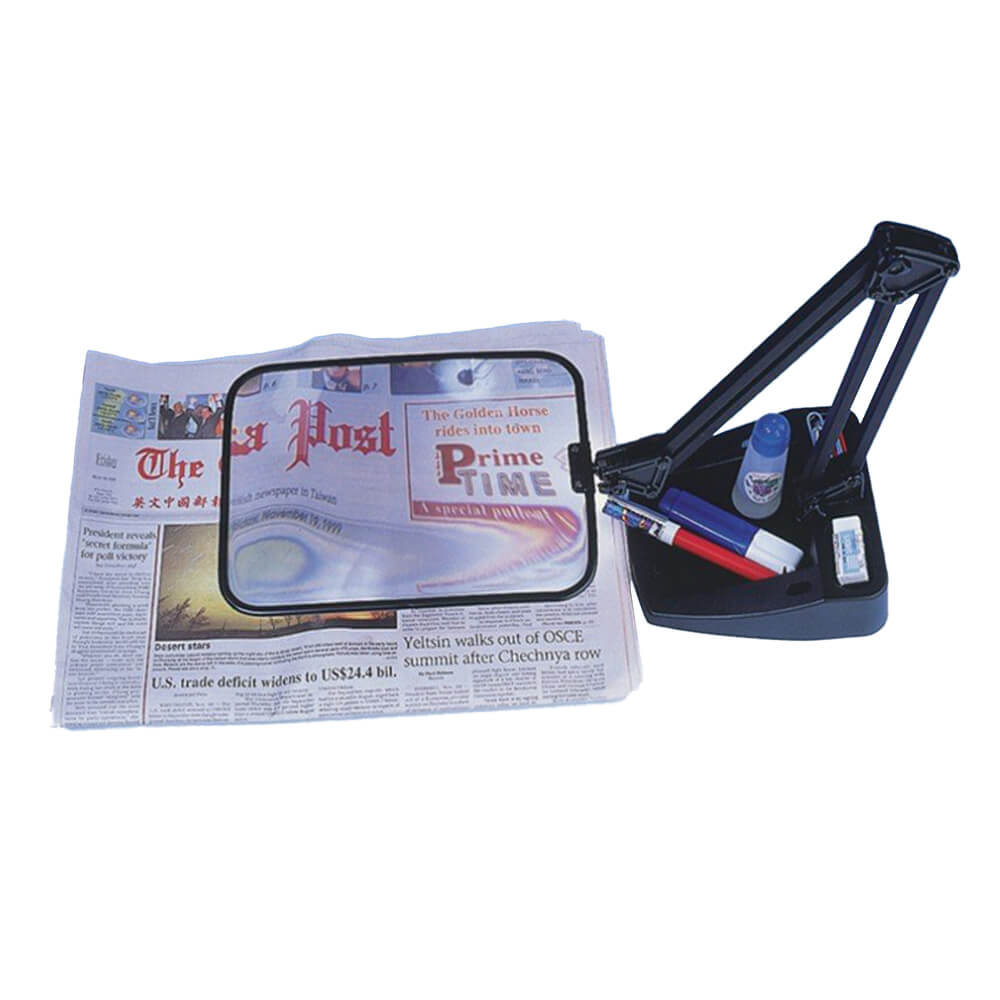
The Able2 PR70057 is a large magnifying glass on a stand, providing hands-free 2x magnification for reading, writing, sewing and other close-up activities. Its acrylic lens is supported by a weighted tabletop base and an adjustable swivelling arm.
Hands-Free Magnification for Everyday Tasks
Unlike a handheld magnifying glass, the Able2 Magnifier on Stand supports the lens above the work surface. This leaves both hands available for holding a book, writing, sewing, crafting or completing another detailed activity.
The large 2x lens enlarges the item beneath it while retaining a generous viewing area. Its position can be adjusted using the swivelling arm until the text or object appears clear.
2x magnification
Enlarges text and details
24 × 16.4cm lens
Large acrylic viewing area
Weighted base
Supports the magnifier on a table
Adjustable arm
Repositions the lens
Large 2x Acrylic Lens
The rectangular acrylic lens measures 24 × 16.4cm, providing a wider viewing area than many conventional handheld magnifiers. Its 2x magnification can make printed text, patterns and smaller details easier to inspect.
Weighted Tabletop Base
A 1.4kg overall product weight and weighted base help support the lens during use. The base should be positioned securely on a stable, level table or desk with its complete footprint supported.
Adjustable Viewing Position
The swivelling arm allows the height and angle of the lens to be changed for different activities. The clearest view can be found by adjusting the position of the lens and the distance between the lens and the material beneath it.
Suitable Activities
• Reading books, newspapers, letters and printed instructions
• Writing, completing forms and checking documents
• Sewing, needlework and other crafts
• Examining photographs, labels and other close-up details
Non-illuminated model: This magnifying glass does not contain a built-in light. Position it in a suitably illuminated area or use it with a separate room or task light.
Browse more daily living aids, or view the portable Magnifying Bookmark.
Able2 Magnifying Glass on Stand Specifications
The PR70057 combines a large acrylic lens with an adjustable arm and weighted tabletop base.
| Brand |
Able2 |
| Model |
Magnifier on Stand |
| Product SKU |
PR70057 |
| Product Type |
Hands-free tabletop magnifying glass |
| Magnification |
2x |
| Lens Material |
Acrylic |
| Lens Dimensions |
24 × 16.4cm |
| Base Dimensions |
19.5 × 13 × 4.5cm |
| Product Weight |
1.4kg |
| Base Type |
Weighted tabletop base |
| Lens Positioning |
Adjustable swivelling arm |
| Table Clamp |
Not included |
| Built-In Light |
No |
| Power or Batteries Required |
No |
Please note
This is a desktop magnifying glass supported by its weighted base. It is not a floor-standing magnifier, magnifying lamp or clamp-mounted lens.
Setting Up the Magnifying Glass
Correct positioning helps provide a stable base and a clearer magnified image. Set up the magnifier before beginning the intended reading, writing or close-up task.
1. Place the weighted base on a stable, level table or desk.
2. Make sure the complete base is supported and cannot slide over the edge of the surface.
3. Position the book, document or object beneath the lens.
4. Support the base while moving the adjustable arm slowly into the required position.
5. Adjust the height and angle of the lens until the image appears clear.
6. Check that the lens remains stable before beginning the activity.
Finding a Clear Image
A magnifying lens has a particular working distance. If the image appears blurred, move the lens slightly closer to or farther away from the reading material rather than assuming the lens is faulty.
For longer documents, slide the paper or book beneath the lens as you read. This can be easier than repeatedly moving the complete magnifier.
Lighting
This model does not include a lamp. Use sufficient room lighting or position a separate task light so that it illuminates the material without creating distracting reflections across the lens.
Avoid directing intense sunlight through the magnifying lens. When the magnifier is not being used, keep the lens away from direct sunlight and cover or reposition it if necessary.
Stable placement: This product relies on its weighted base and is not designed to be clamped to the table. Do not leave the base partly unsupported or positioned where it could be knocked from the work surface.
Using and Caring for the Magnifier
Handle the lens and adjustable arm carefully to help protect the acrylic viewing surface and maintain a stable working position.
During Use
• Keep the weighted base fully supported on a stable, level surface.
• Hold the base steady when repositioning the arm or lens.
• Move the arm gradually and do not force it beyond its natural range of movement.
• Keep sharp objects away from the acrylic lens.
• Reposition the reading material carefully to avoid striking or scratching the underside of the lens.
Cleaning the Acrylic Lens
Remove loose dust using a clean, soft cloth suitable for optical or acrylic surfaces. If further cleaning is required, use a lightly dampened soft cloth and then dry the lens carefully.
Do not use abrasive cloths, scouring pads or harsh cleaning products. These may scratch, cloud or otherwise damage the acrylic lens.
Regular Checks
• Check the lens for cracks or other damage.
• Confirm that the arm continues to hold the lens securely in position.
• Inspect the base and arm joints if the magnifier becomes unstable.
• Stop using the product if any component is loose, broken or unable to support the lens safely.
When Not in Use
Leave the magnifier in a stable position where it cannot fall or be knocked from the surface. Keep it away from direct sunlight, excessive heat and areas where the lens may be scratched.








Reviews
There are no reviews yet.